Free software to change the colour of folder icons
Rainbow Folders provides users with a quick and streamlined method to change the colour of their existing folder icons. Not only is this able to offer an extra sense of visual allure, but it can be very useful when categorising different folders based off of their contents. As this is a freeware bundle, users are not required to pay a fee for a download.
Core Functions and Main Options
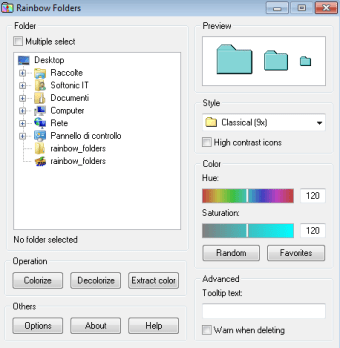
Rainbow Folders is highly precise in regards to the colour options available. As opposed to choosing from a drop-down menu of preselected hues, the user can drag has or her mouse icon over a colour palette. The tone will then be displayed within a preview box. It can be chosen and immediately implemented. There is also the possibility to choose high-contrast icons; a useful tool in the event that a certain folder needs to take precedence over the others.
Other Tools and Details
Rainbow Folders can change the icon size of a specific folder and it is likewise possible to select a number of folders at the same time for conversion. Users are able to navigate to various portions of their computer via a menu located on the left-hand side of the main window. The file is only 810.75 kilobytes, so there should be no memory concerns.
Pros
This is a completely free software package.
Nearly limitless tones can be accessed.
Cons
It is only available for English speakers.
This package has been designed for Windows XP systems (newer versions might not work).
Rainbow Folders (RF) is an easy to use program, which allows you to change the color of the icon representing a chosen folder to any color you like. What for? Mainly to boost yours computer usage speed & skills. When you're exploring a directory which contains lots of subdirectories in Windows Explorer you can easily commit a mistake, e.g. by clicking on a folder's icon which has a similar name to the one you really wanted. With the folders marked with different colors of your choice you won't make any mistakes and after some time you'll be clicking the right folders by impulse.
You can colorize an unlimited number of folders - each into a different color. So you could, for example, color all important folders red, all frequently visited folders green etc. Also the effect of colorizing folders is not only visible in Explorer but in whole system, so also in any directory selection tree, and open/save dialog in any Windows application. But changing colors is not the only thing you can do with RF, you can also set an extra warning when someone tries to delete a colorized folder, and optional text that will 'pop up' when the cursor stops above the folder's icon for a while.
Lovely while it lasted.. I loved it until it quit working. I've tried installing it many times, but when I choose it from the context menu, it only brings up the setup.exe file. Very sad to lose it. Pros: Ease of use Cons: No longer works
Anonymous user
Love this program!. This helps me organize my files on the computer. I can flag hot projects Red and downgrade as needed to a cooler color
Anonymous user
Excellent Software and highly recomended!. Tried all sorts of folder color programs, this is by far the best and is easy to use.The paid Folder Marker version is useless, do not pay for it. As soon they have a new version you are not able to install any previous versions of there Software. Be aware do not purchase Folder Marker. Rainbow Folders is top notch!Hopefully the developer updates this excellent program. Cheers Pros: Everything Cons: Right click option to choose color
Laws concerning the use of this software vary from country to country. We do not encourage or condone the use of this program if it is in violation of these laws. Softonic may receive a referral fee if you click or buy any of the products featured here.












.png)